
Locating your Incident Workspace
Follow these steps to open an Incident Workspace:
- From the main menu, select Incident Management.
- Select "Switch Workspace" to navigate between various Incident Workspaces.
- Select the incident name to open the Incident Workspace.
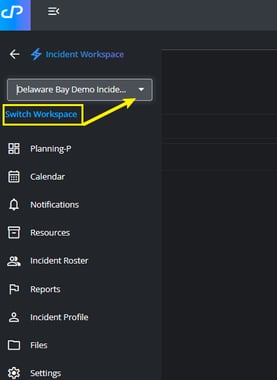
- Once inside the workspace, use main menu to move between sections such as:
- Planning-P
- Calendar
- Notifications
- Resources
- Incident Roster
- Reports
- Incident Profile
- Files
- Settings
What can I do inside an Incident Workspace?
The Incident Workspace serves as the operational hub for a specific incident. Depending on your permissions, you may be able to:
- View and manage operational periods
- Create and review incident forms
- Track personnel and resources
- Share reports and updates
- Manage incident files and documentation
- Coordinate planning and operational activities
Tips for navigating Incident Workspaces
- Use the Planning-P section to follow the operational planning cycle.
- Check Notifications for recent updates and important activity.
- Use Reports to review SITREPs and other incident documentation.
- Access Files for supporting documents and attachments related to the incident.