
In PRATUS, the ICS-233 is managed within the Planning-P section of the Incident Workspace.
Before you begin, make sure you:
-
Have access to the appropriate Incident Workspace
-
Are assigned permissions to edit incident forms
How to Edit the ICS-202
- Open the appropriate Incident Workspace.
- Select Planning-P from the main menu.
- Navigate to the appropriate operational period by selecting either "Current Period" or "Future Period" at the top of the page.
- Select ICS-233 from the available forms and documents.
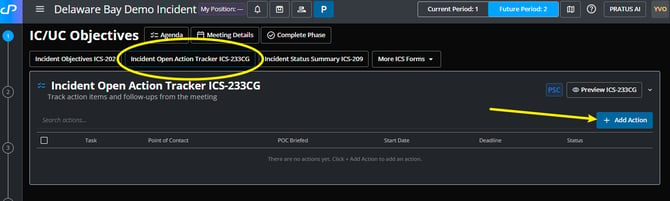
- Select "+Add Action" to create action items and follow ups from the meeting.
-
Update the necessary information. Depending on your organization’s workflow and requirements, this may include:
- Task Details
-
- Assignment information
- Status
- Start and Due times
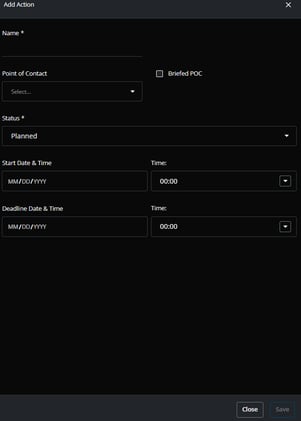
- Select Save to preserve your changes.
Important Notes:
-
Changes made to the ICS-233 may impact operational planning and downstream incident documentation.
-
Some fields may auto-populate from other areas of PRATUS depending on your organization’s workflow configuration.
-
Editing access may be restricted once an operational period is finalized or approved.