
In PRATUS, the ICS-202 is managed within the Planning-P section of the Incident Workspace.
Before you begin, make sure you:
-
Have access to the appropriate Incident Workspace
-
Are assigned permissions to edit incident forms
How to Edit the ICS-202
- Open the appropriate Incident Workspace.
- Select Planning-P from the main menu.
- Navigate to the appropriate operational period by selecting either "Current Period" or "Future Period" at the top of the page.
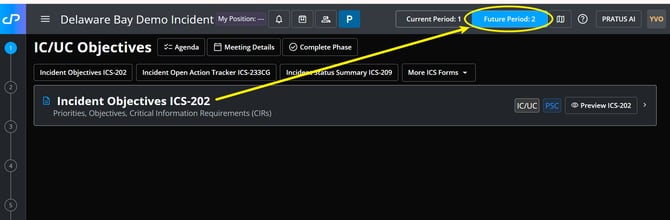
- Find and select the ICS-202 to make edits.
- Update the necessary sections of the form, which may include:
- Incident Priorities
- Incident Objectives
- Select the Edit icon next to each objective to edit details.
- Operational Command Emphasis
- Site Safety Plan details
- Critical Information Requirements (CIRs)
- Key Decisions & Procedures
- Planned Start & Stop Time of Next Operational Period
- Limitations & Constraints
- Review your updates for accuracy and completeness.
- Select Save to preserve your changes to each section.
Important Notes:
-
Changes made to the ICS-202 may impact operational planning and downstream incident documentation.
-
Some fields may auto-populate from other areas of PRATUS depending on your organization’s workflow configuration.
-
If the operational period has already been finalized or approved, editing permissions may be restricted.