Tip: Before you begin, make sure you have:
-
Have access to the appropriate AOR
-
Have permissions to create or edit SITREPs
Create a Draft AOR SITREP
Follow these steps to create a new draft SITREP:
- Navigate to the Reports tab from the Hub, which you will see along the top of the screen.
- Select the appropriate AOR or Incident from the dropdown list.
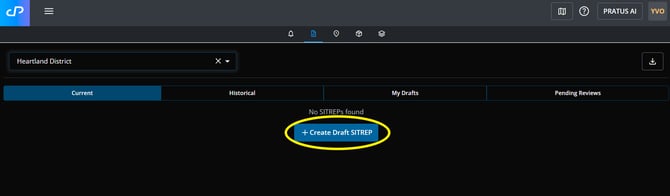
- Select "Create a Draft SITREP":
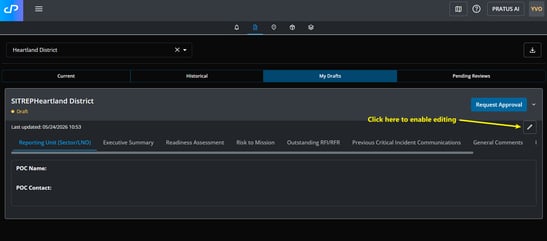
- Enter the appropriate details by navigating through the SITREP sections along the top of the draft.
- Select "Request Approval" when you have completed the draft.
Editing a Draft AOR SITREP
You can continue updating a draft SITREP at any time before approval.
To edit an existing draft:
- Navigate to Reports within the AOR.
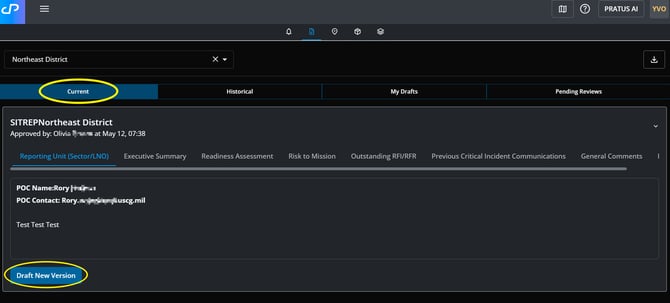
- Locate the draft SITREP and select "Draft a New Version".
- Make your updates.
- Save your changes.
Note: To quickly access Drafts you have started, you can navigate to the "My Drafts" tab of Reports after you select your AOR/Incident.
How do I submit my draft for review and approval?
Follow these steps to request approval of your drafted AOR SITREP:
- Navigate to the My Drafts tab in Reports, which you will see along the top of the screen.
- Select the draft that is ready for review and approval.
- Select "Request Approval" to send your draft to the next stage of the workflow.
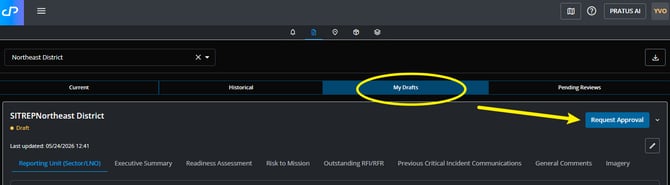
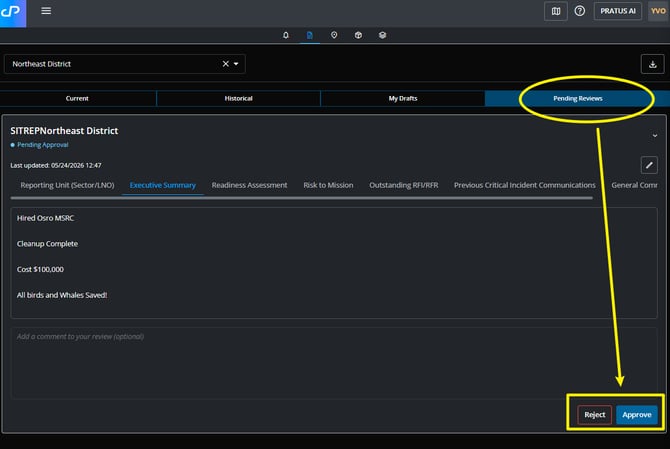
- You can view your pending requests in the "Pending Reviews" tab across the top of the screen.
- If you are a role that Rejects or Approves the requests, you will find the options to do so at the bottom of the submitted AOR SITREP.